
1. Introduction – Why KYC Is Important on Magic Win in 2026
In the world of online gaming and betting, trust and security matter more than ever—especially in 2026, where platforms must follow strict digital verification rules. Magic Win ensures a safe betting environment for all users, and the KYC process (Know Your Customer) is a major part of that safety. Whether you’re a beginner just signing up or an experienced player, completing KYC is the first and most important step to unlocking full account access.
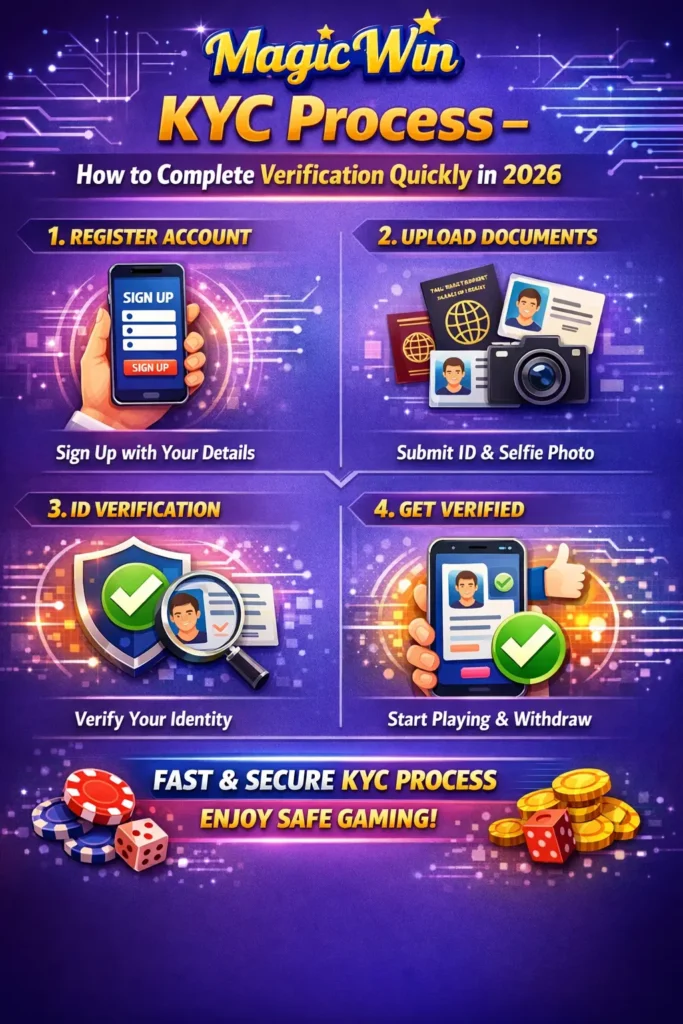
KYC helps Magic Win confirm your identity, protect your winnings, and secure your account from fraud. Without verification, your access remains limited—you may not be able to withdraw funds, participate in certain events, or enjoy full features on the platform. By following the Magic Win Signup Guide and KYC process properly, you ensure smooth gameplay, safe transactions, and faster support responses.
In simple terms, KYC is your official entry pass to using Magic Win fully and safely. It proves that you’re a real user, meets legal requirements, and ensures that your financial transactions remain 100% secure. In this guide, you’ll learn everything you need to complete your Magic Win KYC quickly—including documents, steps, common mistakes, and pro tips for instant approval.
If you’re new and looking for a clear, step-by-step explanation, this guide will walk you through the entire process with ease.
Table of Contents
2. Understanding the Magic Win KYC Process (Beginner-Friendly Overview)
Before you start uploading documents or filling forms, it’s important to understand what the Magic Win KYC process actually is and why it plays such a major role in keeping your account safe. Magic Win follows globally accepted verification standards to ensure only real, legitimate, and age-verified users access the platform. This protects both you and the platform from fraud, unauthorized usage, and security risks.
What is KYC on Magic Win?
KYC (Know Your Customer) is a verification system that confirms your identity using official documents. In simple terms, Magic Win wants to ensure:
- You are a real person
- You meet the minimum legal age requirement
- You are not using a fake or duplicate account
- Your financial withdrawals are going to the correct person
Think of KYC as a security shield. Once completed, your account becomes safer, more trusted, and fully functional.
Why Does Magic Win Require KYC in 2026?
The year 2026 brings stricter online gaming regulations worldwide. Magic Win follows these rules to stay compliant and maintain a secure environment. KYC is required for:
- Verifying identity
- Preventing fraud
- Ensuring safe transactions
- Activating wallet withdrawal
- Protecting user winnings
- Avoiding fake accounts
- Complying with legal standards
These measures ultimately benefit every user by making the platform more reliable and trustworthy.
What Happens If You Don’t Complete KYC?
If you skip KYC or delay it, you will face restrictions on your Magic Win account, such as:
- Limited deposit access
- No withdrawal of winnings
- Restricted bonuses
- Possible account freeze during suspicious activity
- Delayed customer support
This is why completing KYC early is highly recommended. The platform itself encourages users to complete verification within the first 24–48 hours after creating an account.
How Long Does Magic Win KYC Take?
The Magic Win Signup Guide mentions that document approval is generally very fast. In most cases:
- Basic KYC → 5 to 30 minutes
- Full verification → 1 to 6 hours
But timing depends on document clarity and accuracy.
Who Should Complete KYC?
Every new user on Magic Win must complete KYC. Whether you are:
- A beginner
- A regular player
- A high-volume gamer
- Someone planning to deposit/withdraw
KYC is compulsory.
Simple Example to Understand KYC
Imagine going to a bank to open an account. They verify your ID to confirm you’re a real person before allowing you to use their services. Magic Win works the same way but online—and much faster!
Summary (Easy to Remember)
The Magic Win KYC process is:
✔ Simple
✔ Fast
✔ Secure
✔ Mandatory
✔ Designed for user protection
3. Documents Required for Magic Win KYC Verification
Before you begin the KYC process on Magic Win, it’s important to have the correct documents ready. Having everything prepared in advance ensures faster approval, fewer errors, and a smooth verification experience. Magic Win follows strict verification standards, so only official, government-approved documents are accepted.
In this section, we’ll go through the exact list of documents, explain why each document is needed, and share practical tips so your verification gets approved on the first attempt.
Why Are These Documents Required?
Magic Win requires authentic documents to confirm your identity, age, and address. This helps the platform maintain:
- A secure betting environment
- Protection from fake or duplicate accounts
- Legally compliant verification standards
- Fast and reliable withdrawal processing
- Enhanced account safety for users
With the right documents, the verification team can quickly verify your information.
List of Accepted Identity Proof Documents
You must upload one clear and valid ID document. Magic Win generally accepts the following:
1. Aadhaar Card
- Most commonly accepted
- Includes both age and address
- Fastest verification approval
2. PAN Card
- Accepted for identity proof
- Must be clear and readable
- Useful for financial verification and withdrawals
3. Passport
- A strong identity document
- Works for both ID & address verification
4. Driving License
- Accepted as ID proof
- Ensure both front and back are uploaded (if required)
Address Proof Documents (If Required Separately)
Sometimes Magic Win may ask for an additional document to verify your address. You can use:
- Aadhaar Card (most preferred)
- Passport
- Driving License
- Utility Bill (Electricity, Water, Gas – not older than 3 months)
- Bank Statement (with full name and address visible)
Tip: Aadhaar card is the best all-in-one preferred document for quick approval.
Bank Verification Documents (For Withdrawals)
To activate deposits/withdrawals smoothly, Magic Win may ask for bank-related documents such as:
- Bank Passbook (photo of first page)
- Cancelled Cheque
- Bank Statement (latest)
- UPI ID Screenshot (sometimes requested to confirm details)
This step ensures that your winnings are sent to the right account.
Selfie Verification (For Identity Confirmation)
In 2026, many platforms—including Magic Win—require a live selfie to match your ID proof. The selfie helps confirm:
- You are the real owner of the account
- No one is impersonating you
- Your face matches the uploaded ID
You may also be asked for a selfie holding your ID card.
Important Document Requirements
To avoid delays or rejection, your documents must follow these basic rules:
- Must be clear and not blurry
- All details must be visible
- Documents should be valid (not expired)
- File size should meet platform limits
- No edited or photoshopped documents
- Avoid flash glare on plastic cards
- Upload both sides of ID if necessary
Real-Life Example
If you upload an Aadhaar card picture but it is blurry or your name is not readable, the verification team will reject it.
But if you upload a clear, well-lit photo of both sides, the system approves it in 5–15 minutes.
Quick Checklist Before Uploading
Use this checklist to ensure fast approval:
- ✔ Clear photo
- ✔ Full document visible
- ✔ No fingers covering edges
- ✔ Proper lighting (natural daylight works best)
- ✔ Name & DOB readable
- ✔ Address visible (if needed)
- ✔ Selfie matches ID
Having these documents ready will make your Magic Win Signup Guide and KYC process smooth, fast, and stress-free.
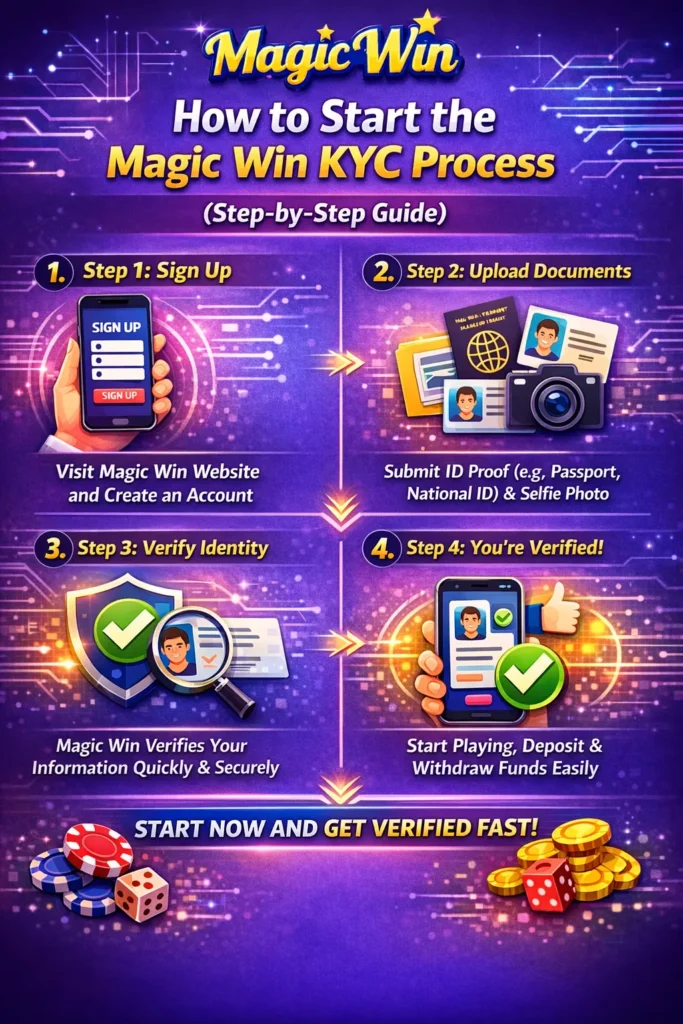
4. How to Start the Magic Win KYC Process (Step-by-Step Guide)
Starting the Magic Win KYC process is simple, but doing it correctly ensures fast approval without delays. Below is a clean, beginner-friendly Step-by-Step guide explaining exactly how to start and complete your KYC smoothly.
Step 1 – Login to Your Magic Win Account
Begin by logging into your Magic Win account using your registered mobile number or username and password.
Using the same mobile number you signed up with helps avoid verification issues later.
Step 2 – Open the Profile or Account Settings
Once logged in, go to the Profile, Account, or Settings section.
There you will find options like:
- Profile
- Wallet
- Security
- KYC / Verification
- Bank Details
Tap on KYC or Verification to begin the process.
Step 3 – Choose the Type of KYC
Magic Win usually offers:
- Basic KYC
- Complete KYC
- Video KYC (if required)
Start with Basic KYC, as it unlocks most features and speeds up the verification process.
Step 4 – Enter Your Personal Details
Fill in your accurate information:
- Full Name
- Date of Birth
- Gender
- Complete Address
- Pincode, City, State
Make sure every detail exactly matches what is printed on your ID.
Any mismatch = instant rejection.
Step 5 – Select Your ID Document Type
Choose the document you want to use for verification:
- Aadhaar Card
- PAN Card
- Passport
- Driving License
If the document has two sides, the system may ask for both front and back images.
Step 6 – Upload Your Documents Properly
Upload clear, well-lit photos of your document. Ensure:
- Entire card is visible
- No blur
- No flash glare
- Details like name, DOB, and ID number are readable
This step affects approval speed more than anything else.
Step 7 – Complete Selfie Verification
Magic Win may ask for:
- A normal selfie
- A selfie holding your ID
- A short live video verification
Your face must be clearly visible with good lighting and no accessories (caps, sunglasses, masks).
Step 8 – Submit Your KYC Application
After uploading everything:
- Recheck your details
- Confirm all images are clear
- Click on Submit KYC
A notification will appear:
“Your KYC is under review.”
Step 9 – Wait for Approval
Magic Win processes verification quickly:
- Basic KYC: 5–30 minutes
- Full KYC: 30–90 minutes
- Advanced KYC: 1–6 hours
You will get a message once approved or if document re-upload is required.
Step 10 – Enjoy Full Account Access
After approval, your Magic Win account becomes:
- Fully secure
- Withdrawal-ready
- Bonus-eligible
- Limit upgraded
- Trusted & verified
Your profile will show KYC Verified, meaning you can now use all platform features safely.
5. How to Upload Documents Correctly for Fast Approval
Uploading your documents properly is the most crucial part of the Magic Win KYC process. Even a small mistake—like glare, blur, or half-visible cards—can slow down approval or lead to rejection. This section explains exactly how to upload documents the RIGHT way so your Magic Win KYC gets approved quickly.
Why Proper Document Upload Matters
Magic Win uses both AI scanning and manual verification. If your document is unclear, the system cannot read it, and the verification team will reject your application.
Good-quality uploads → Fast approval (5–20 minutes)
Bad-quality uploads → Delays or rejection
Step-by-Step Guide to Uploading Documents Correctly
Step 1 – Choose the Best ID Document
Select a document that is clear and easy to read. The recommended order is:
- Aadhaar Card (best, fastest approval)
- Passport
- Driving License
- PAN Card (good for ID but not for address)
Avoid documents that are damaged or faded.
Step 2 – Place Your Document on a Clean Surface
Pick a simple background, such as:
- A white sheet
- A clean table
- A flat surface
Avoid patterned backgrounds. Don’t cover edges with your fingers.
Step 3 – Use Good Lighting
Lighting directly affects approval speed.
- Best: Natural daylight (soft sunlight)
- Avoid: Flash (creates glare), dark rooms, shadows
Your document must be evenly lit.
Step 4 – Capture a Clear Photo
Hold your phone steady and capture the entire document with all corners visible.
Tips:
- Don’t zoom too much; step back slightly
- Ensure your name, date of birth, and ID number are readable
- Take front and back if required
Step 5 – Check the Image Before Uploading
Review the photo carefully:
- Is the text readable?
- Is anything blurred?
- Is the photo too dark or bright?
- Is the full card visible?
If anything looks unclear, retake the photo immediately.
Step 6 – Upload Only High-Quality Images
Magic Win supports JPG, JPEG, and PNG.
Avoid:
- Screenshots
- Edited or filtered images
- Scanned images with glare
- Cropped images where edges are missing
Uploading manipulated images increases rejection chances.
Tips for Selfie & Video Verification
Selfie Verification Tips
- Use a clean background
- Keep your face fully visible
- Avoid sunglasses, mask, or cap
- Ensure front-facing light is hitting your face
Selfie with ID
- Hold your ID close to your face
- Show your full face clearly
- Keep the ID readable
Video KYC (If Required)
- Hold the camera steady
- Follow on-screen instructions
- Move or speak only when prompted
- Ensure your face stays inside the frame
Common Uploading Mistakes to Avoid
Avoid these mistakes if you want fast approval:
- Blurry or shaky photos
- Flash glare on ID cards
- Shadows covering text
- Cropped or half-visible documents
- Using someone else’s ID
- Details that don’t match your profile
- Expired documents
- Low-resolution images
Just one small error can result in immediate rejection.
Real-Life Example
Incorrect Upload:
A PAN card photo taken in low light with flash glare → ID number not readable → KYC rejected.
Correct Upload:
An Aadhaar card photo placed on a white surface under daylight → Every detail clear → KYC approved in 10 minutes.
Quick Verification Checklist
Before you hit submit, confirm:
- ✔ Clear, readable document
- ✔ Full edges visible
- ✔ No glare
- ✔ No shadow
- ✔ Name, DOB, ID number visible
- ✔ Selfie matches the ID
By following these steps, your Magic Win KYC will be approved quickly and smoothly with no delays.
6. Common KYC Errors & How to Avoid Delays in Verification
Even though the Magic Win KYC process is simple, many users face delays because of small but critical mistakes. These errors can slow down approval, cause repeated rejections, or even temporarily lock your account. This section explains the most common KYC mistakes, why they happen, and how you can avoid them to ensure a smooth, fast, and successful verification.
Avoiding these errors is essential to completing the Magic Win Signup Guide effectively.
1. Blurry or Low-Quality Document Photos
One of the biggest reasons for rejection is unclear images. If the verification team cannot read your name, number, or date of birth, they will reject your KYC instantly.
How to avoid:
- Capture photos in natural light
- Hold the camera steady
- Avoid zooming too close
- Make sure all details are sharp
2. Flash Glare on the ID Card
Flashlight reflection often hides important information like ID number or photo.
How to avoid:
- Turn off camera flash
- Use soft daylight
- Tilt the card slightly to remove reflection
3. Cropped or Half-Visible Documents
Your entire ID card must be fully visible in the frame. Many users accidentally upload half-cut images.
How to avoid:
- Ensure all corners are clearly visible
- Do not crop or trim the photo
- Hold the document steady on a flat surface
4. Mismatched Personal Details
If your Magic Win profile name doesn’t match your ID exactly, KYC will fail.
Common mismatch examples:
- “Amit Kumar” vs “Amit K.”
- Wrong spelling
- Wrong date of birth
- Nickname instead of full name
How to avoid:
Always enter details exactly as shown on your ID.
5. Using Someone Else’s Documents
Some users upload documents belonging to friends or family.
Magic Win rejects them instantly.
How to avoid:
Use only your own verified documents.
6. Expired or Invalid Documents
Driving License, Passport, or any ID that is expired is not accepted.
How to avoid:
Check the expiry date before uploading.
7. Shadows Covering Important Areas
Shadows on the card hide text, photo, or numbers.
How to avoid:
- Use good lighting
- Ensure no hand shadow covers the card
8. Incorrect File Type or Size
Wrong formats or oversized files may not upload properly.
How to avoid:
- Use JPG/JPEG/PNG
- Keep file size within recommended limits
9. Re-uploading Without Checking the Issue
Some users upload the same image again after rejection without checking what went wrong.
How to avoid:
Always review the rejection reason and fix it before re-uploading.
10. Poor or Incomplete Selfie Verification
Selfie mismatch is a major cause of rejection in 2026.
Common issues:
- Face not clearly visible
- Wearing glasses or mask
- Too dark background
- Face not matching ID photo
How to avoid:
- Capture your selfie in uniform lighting
- Show full face
- Keep background plain
- Maintain a neutral expression
Real-Life Example
A user uploads a dark Aadhaar photo taken at night → text unreadable → KYC rejected.
After re-uploading a clear daylight image → KYC approved within 8 minutes.
Quick KYC Error Checklist
Before submitting, confirm:
- ✔ No blur
- ✔ No glare
- ✔ Full document visible
- ✔ Details match ID
- ✔ Valid document
- ✔ Good selfie clarity
When you avoid these common errors, the Magic Win verification team approves your KYC much faster—saving time, effort, and frustration.
7. Magic Win Advanced Verification (Address, Banking & Video KYC)
Once your basic KYC is approved, Magic Win may ask you to complete Advanced Verification to unlock full access—especially withdrawals, higher limits, and secure account protection. Advanced KYC ensures that your identity, address, and banking details are 100% verified according to 2026 safety standards.
This section explains everything clearly so you can complete advanced KYC quickly, safely, and without mistakes.
Address Verification – Why It’s Important
Address verification confirms that the user belongs to a genuine and reachable location.
Magic Win requires this step to maintain platform transparency and prevent fake accounts.
Accepted Address Documents:
- Aadhaar Card (most recommended)
- Passport
- Driving License
- Utility Bills (Electricity, Water, Gas – not older than 3 months)
- Bank Statement with full address
Important: The address must match the address you entered during signup or profile update.
How to Upload Address Proof Correctly
- Capture the full document clearly
- Ensure your name + address are readable
- If using a utility bill or bank statement, make sure it’s recent
- Avoid screenshots from unofficial apps
- Avoid folded, torn, or cut-off pages
A clear scan or photo taken in daylight is ideal for fast approval.
Bank Verification – Required for Withdrawal Activation
To withdraw money safely, Magic Win requires accurate banking details. This step ensures that winnings are transferred to the correct bank account and prevents fraud.
Documents You May Need:
- Bank Passbook (first page)
- Cancelled Cheque
- Latest Bank Statement
- Screenshot of UPI ID (optional, if requested)
Details Must Be Visible:
- Your Name
- Bank Name
- Account Number
- IFSC Code
Common Bank KYC Mistakes:
❌ Using someone else’s bank account
❌ Uploading blurry passbook images
❌ Wrong IFSC code
❌ Incomplete screenshots
Correct Way:
✔ Upload your own bank details
✔ Ensure all details are visible
✔ Keep the image clear and bright
Video KYC – The Final Verification Step (If Required)
In 2026, many platforms like Magic Win use Video KYC for extra security.
This step confirms that the person using the account is real, active, and matches the ID photo.
How Video KYC Works:
- You may get a popup: “Start Video Verification”
- Follow the on-screen instructions
- Your camera will activate
- You may be asked to:
- Show your face clearly
- Hold your ID next to your face
- Move your head slightly
- Read/pass simple instructions
The entire process usually takes 20–40 seconds.
Tips for a Perfect Video KYC
- Sit in a well-lit area
- Keep a plain background
- Hold your ID steady near your face
- Don’t shake or move too fast
- Make sure your microphone & camera work properly
Why Advanced KYC Matters
Completing advanced verification unlocks:
- ✔ Instant withdrawals
- ✔ Higher deposit/withdrawal limits
- ✔ Extra bonuses and offers
- ✔ Stronger account security
- ✔ Faster customer support
- ✔ Full account access without restrictions
Advanced KYC is not just a requirement; it’s a safety upgrade for your Magic Win profile.
Real Example
A user uploaded clear bank passbook details + Aadhaar address proof + completed video KYC → Full verification completed within 25 minutes.
Another user uploaded low-quality dark images → Verification delayed for 2 days.
Completing Advanced Verification properly ensures your Magic Win account stays secure, fully accessible, and smooth for all transactions.
8. How Long Does Magic Win KYC Take? (2026 Updated Timelines)
One of the most common questions new users ask is:
“How much time does Magic Win KYC actually take in 2026?”
The good news is that the Magic Win verification system has become faster, smarter, and more automated this year. The platform uses advanced AI scanning combined with manual verification to ensure accuracy while keeping the approval process quick.
Below is the complete timeline breakdown, along with factors that affect approval speed.
Average KYC Approval Time in 2026
Magic Win’s updated verification process usually takes:
- Basic KYC: 5–30 minutes
- Full KYC (ID + Address): 30–90 minutes
- Advanced KYC (Bank + Video): 1–6 hours
If your documents are clear and your details match perfectly, your verification may even complete within minutes.
What Makes Magic Win KYC Faster in 2026?
Magic Win has upgraded its verification workflow using:
- Automated document scanning
- AI-based identity matching
- Faster manual review support
- Real-time selfie comparison
- Quick re-upload feature for rejected images
These enhancements ensure that even high-volume periods have smooth verification processing.
Factors That Can Increase KYC Time
While the system is fast, some issues may cause delays:
1. Blurry or unclear documents
If the system cannot read your ID number or photo, verification slows down.
2. Mismatched personal details
Wrong name, date of birth, or spelling mistakes lead to manual review.
3. Poor selfie match
Bad lighting, face not visible, or unclear selfie slows down AI verification.
4. High traffic time
During big tournaments or events, processing may take longer.
5. Bank verification issues
If your bank account name doesn’t match your ID name, the process stalls.
6. Expired or low-quality ID
Old or damaged ID cards take longer for the system to scan.
Fastest Ways to Get Instant KYC Approval
Use these tips to get approved in 5–10 minutes:
- Use Aadhaar Card for ID verification
- Take photos in natural daylight
- Avoid flash glare
- Match your Magic Win profile name with your ID
- Upload both sides of the document clearly
- Take a clean selfie with a neutral background
- Hold your phone steady while capturing the image
These small steps can make a big difference.
Real-Life Examples
Example 1 – Fast Approval
A user uploads a clear Aadhaar card picture taken in daylight + perfect selfie →
KYC verified in 7 minutes.
Example 2 – Slow Approval
Another user uploads a dark, blurry image with incorrect spelling in the profile name →
KYC delayed by 2–4 hours until documents are re-uploaded.
When Should You Contact Support?
You should contact Magic Win support if:
- KYC is pending for more than 24 hours
- You receive multiple rejections even after uploading clear photos
- You cannot access the upload portal
- Your video KYC fails repeatedly
Support usually assists quickly once you provide screenshots.
Summary of KYC Timeline
- Fastest approval: 5–10 minutes
- Average time: 30–60 minutes
- Maximum time: 6 hours (rare cases)
If your documents are clear and accurate, the Magic Win Signup Guide ensures a fast and easy verification experience.
9. FAQs – Magic Win KYC Process
Here are the most commonly asked questions about the Magic Win KYC process, explained in simple and clear language. These FAQs will help beginners and intermediate users understand everything easily and avoid mistakes during verification.
1. What is KYC on Magic Win?
KYC (Know Your Customer) is the process of verifying your identity using official documents like Aadhaar, PAN, Passport, or Driving License. It ensures account safety and prevents fraud.
2. Is KYC mandatory on Magic Win?
Yes. Without completing KYC, you cannot access full features such as withdrawals, bonuses, and secure transactions.
3. How long does Magic Win KYC take?
The KYC approval time is usually:
- Basic KYC: 5–30 minutes
- Full KYC: 30–90 minutes
- Advanced KYC: 1–6 hours
Clear documents → Faster approval.
4. Which documents are accepted for KYC?
Magic Win accepts:
- Aadhaar Card
- PAN Card
- Passport
- Driving License
For address verification, you may need utility bills or bank statements.
5. Why did my KYC get rejected?
Common reasons include:
- Blurry documents
- Glare or shadows
- Wrong personal details
- Using someone else’s ID
- Expired documents
- Poor selfie match
Fix the issue and re-upload.
6. Can I use someone else’s documents for verification?
No. Documents must belong to you. Using someone else’s ID will cause permanent rejection.
7. Why does Magic Win need a selfie?
Selfie verification ensures that the person submitting the documents is the real owner of the account. It prevents misuse and identity fraud.
8. Do I need to upload both sides of my Aadhaar card?
Yes, uploading both sides helps verify your address, photo, and unique ID number correctly.
9. What is Video KYC?
Video KYC is a live verification step where you show your face and ID on camera. It confirms your identity in real-time and boosts security.
10. Can I withdraw money without KYC?
No. Withdrawals are unlocked only after completing full verification.
11. My documents are clear. Why is my KYC still pending?
Possible reasons:
- High verification traffic
- Manual review required
- Details mismatch
- Bank verification pending
If it takes more than 24 hours, contact support.
12. What if my name in the document is slightly different from my profile name?
Even small differences can cause rejection. Always enter your name exactly as printed on your ID.
13. Which document gives the fastest approval?
Aadhaar Card usually gives the fastest approval because it includes both identity and address details.
14. Is KYC safe on Magic Win?
Yes. Magic Win uses encrypted technology to secure your documents. Your data is not shared with third parties.
15. Can I redo KYC if I make a mistake?
Yes. If your KYC is rejected, you can re-upload corrected documents.
10. Conclusion + CTA (Complete Your KYC Safely & Start Playing)
Completing the Magic Win KYC process is the most important step for every user who wants a smooth, secure, and unrestricted betting experience in 2026. From identity verification to advanced checks like bank and video KYC, each step plays a vital role in protecting your account, ensuring fast withdrawals, and maintaining the highest level of trust on the platform.
If you’ve followed this guide from Section 1 to Section 9, you now understand:
- Why KYC is mandatory
- Which documents are required
- How to upload documents properly
- How to avoid common verification errors
- How long the entire process takes
- How advanced verification works
- What to do if your KYC gets delayed
By following the instructions properly, you can complete your KYC quickly—often in as little as 5 to 10 minutes if your documents are clear.
Magic Win uses world-class verification technology to ensure:
Top Alternative Online Exchanges to Explore in 2026
| Exchange Name | Official Website Link |
|---|---|
| Mahadev Book | https://mahadev.casino |
| Gold365 | https://gold365.tips |
| MagicWin | https://magicwin.one |
| T20WorldCup | https://t20worldcup.online |
| IPLSatta | https://iplsatta.vip |
- Secure identity protection
- Fast document approval
- Smooth withdrawals
- Better user experience
- Compliance with 2026 regulations
So don’t wait. The sooner you complete your KYC, the sooner you can unlock:
- Full account access
- Instant deposits
- Quick withdrawals
- Bonuses and exclusive offers
- A safe and trusted betting experience
Strong Call to Action
👉 Complete your Magic Win KYC right now and enjoy a secure, fully verified gaming experience today.
The faster you verify, the faster you play—and win.